Turn home requirements into a clear concept plan
and a concept-stage PDF packet.
Floorpln gives homeowners, builders, and design-build teams a fast way to test layout direction, review warnings, and package the concept for a real drafting or builder conversation.
👆 Try it — generate a real plan right now
3
2
1,800 SF
Ready to generate
Adjust specs above and click Generate
< 3s
Avg. generation time
$0
To start — no account
$4.99
PDF concept packages start
3
One-time package options
How it works
From requirements to PDF package in 4 steps
Enter your specs
Enter bedrooms, baths, square footage, story count, and style preferences. Start with the program, not a blank canvas.
Get 3 layouts instantly
Compare three residential concept directions with different adjacencies, circulation paths, and service-core layouts.
Review the concept
Check the plan score, warnings, room schedule, and suggested improvements before you buy anything.
Choose a package
Download a secure PDF concept package and share it with a builder, client, drafter, or designer.
Why Floorpln
Built for early builder decisions.
Not generic home design browsing.
Floorpln is designed to help homeowners and builders compare layout directions, catch obvious planning issues, and hand off cleaner concepts to qualified professionals.
3 layout directions in minutes
Turn a room program into three residential concept layouts quickly so your team can compare options before drafting starts.
Builder-ready PDF package
Download a clean concept-stage PDF package with a room schedule, square-footage summary, design review, and builder handoff notes.
Review before drafting spend
Use the concept package to align on layout direction, room program, and handoff notes before formal drafting begins.
Share and hand off faster
Move from early layout exploration to drafting handoff with share links, cleaner summaries, and builder-friendly next steps.
Builder-focused analysis
Review circulation, program fit, value engineering, and builder standards without drowning the marketing site in feature soup.
Free to generate
Start exploring layouts immediately, then pay only when you need a downloadable PDF concept package.
A cleaner pre-con workflow.
What changes when concept planning stops living in scattered emails and ad hoc sketches.
Without Floorpln
- Rough ideas live in email threads, PDFs, and markup screenshots
- Clients compare one layout at a time with no structured option review
- Early revisions bounce between sales, drafting, and ownership
- Concept packets arrive late or inconsistently formatted
- Buildability and cost concerns show up after client excitement
- The drafting handoff starts with missing context
With Floorpln
- Three concept directions are ready for side-by-side review
- Sales, builder, and client can align on a better starting point
- Builder insights surface circulation, sizing, and value concerns earlier
- The concept package is easier to present and easier to hand off
- Review notes and next steps make the conversation more specific
- Drafting starts with more structure and less backtracking
Built For
The people who build homes.
Custom Home Builders
Show clients 3 layout options before signing. Convert more leads, spend less on pre-con drawings.
Production Builders
Generate standard plans for every lot size in your community. Speed up the selection process.
New Home Sales Teams
Let buyers and clients review a clear concept package early, before drafting budget is committed.
Design-Build GCs
Rough-in layouts for client approval before going to the draftsman. Save 2 revision cycles.
Start the concept phase with better options.
Generate a concept, review the quality score, choose a package only when it is worth downloading, and move into drafting with more confidence.
Generate a Floor PlanSee Floorpln in action
See how Floorpln moves from room requirements to concept review, package selection, and builder handoff.
Pricing
Pricing built for pre-concept work.
Generate for free, then choose the one-time concept PDF package that matches how much review and handoff context you need.
Basic
Best for homeowners exploring an idea.
- Concept floor plan PDF
- Plan summary
- Room schedule
- Square-footage summary
Premium
Best for reviewing more detail before talking to a builder.
- Everything in Basic
- Expanded design review
- Builder handoff notes
- Project notes sheet
Builder
Best for presenting a clean concept package to clients or contractors.
- Everything in Premium
- Client-facing language
- Builder next-step checklist
- Proposal-friendly summary
Show buyers exactly what they're paying for
Every paid package shows exactly what is included: the layout sheet, room schedule, square-footage summary, review notes, warnings, and clearer next-step handoff context.
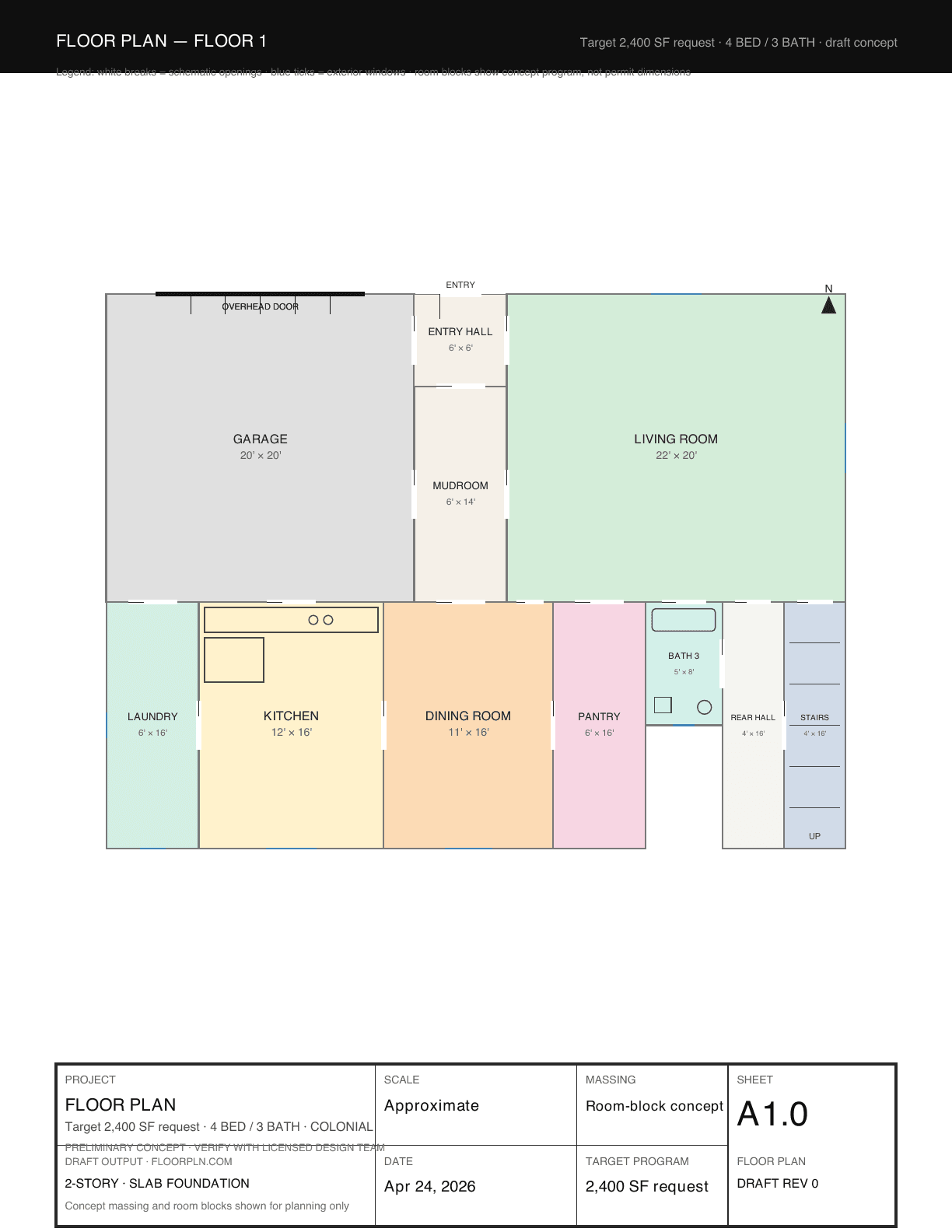
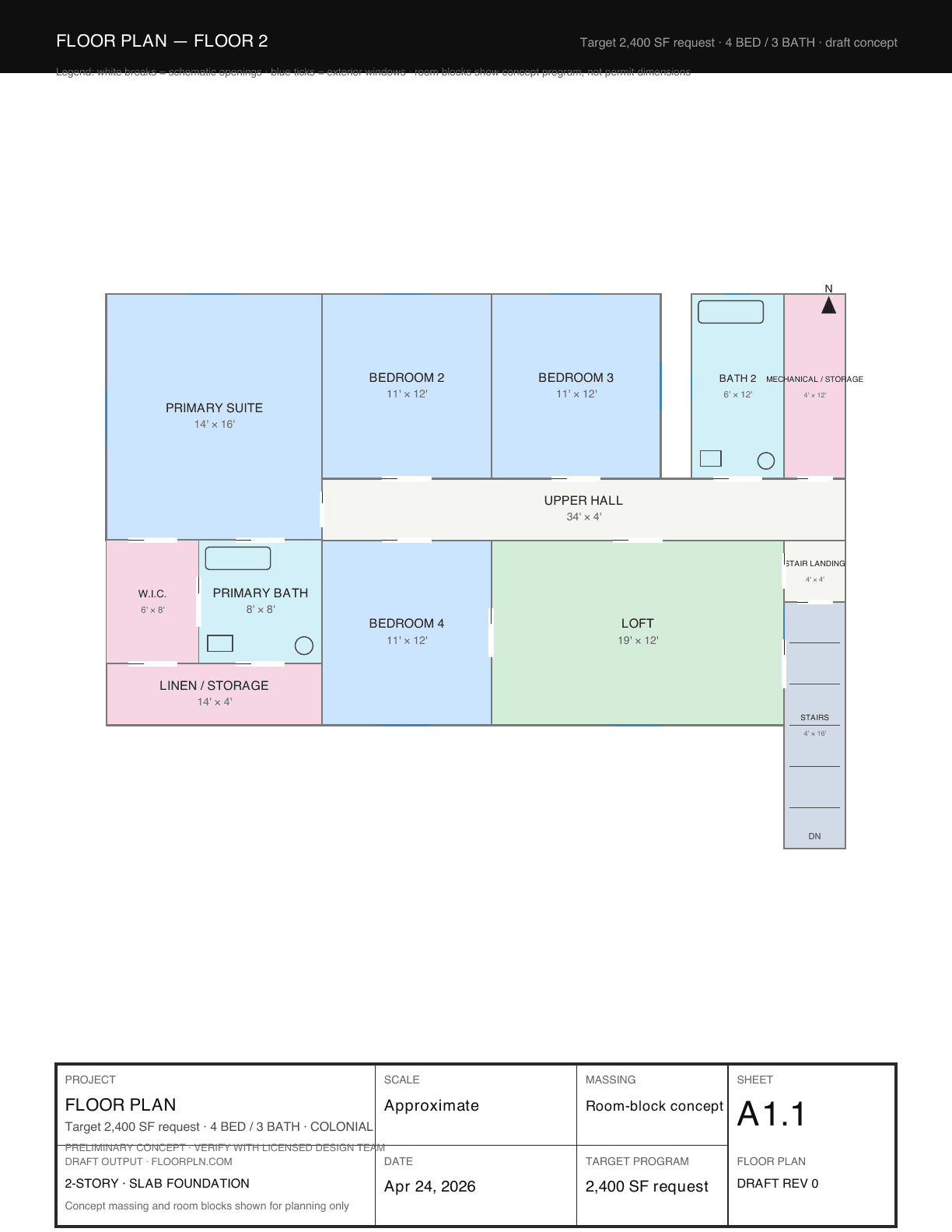
Concept floor plan preview
See the actual draft layout sheet before formal drafting begins.
Room schedule
Review the program room-by-room instead of guessing from a screenshot.
Square-footage summary
Make sure the layout is allocating space the way you expect.
Design review + warnings
Use the score, strengths, and warning notes to judge whether the direction is worth keeping.
Builder handoff notes
Premium and Builder packages add stronger review and handoff framing for the next conversation.
Concept-stage disclaimer
Clear scope so the packet is used for early review, not regulated construction use.
Actual packet preview
Real PDF sheet output · draft concept level
Why builders switch to Floorpln
Compare the alternatives based on the actual pre-con job-to-be-done.
| Floorpln Recommended | Outside concept drafting | General CAD tools | Stock plan catalogs | |
|---|---|---|---|---|
| Time to first concept | Minutes | Days | Hours | Search time varies |
| How many directions per brief | 3 in one run | Usually 1 | Manual redraw | Catalog-dependent |
| Best use case | Pre-concept planning | Custom outsourced concepts | Detailed drafting work | Buying a finished stock plan |
| Client review flow | Shareable packet + link | PDF / email | File exchange | Listing-style browsing |
| Builder insight layer | Included | Usually separate | Manual review | Rare |
| Secure PDF download | Yes | Varies | File exchange | Usually no |
| Drafting handoff readiness | Strong early-stage starting point | Depends on vendor | High, but slower to create | Weak for custom projects |
| Works well on iPad/mobile review | Yes | Limited | Limited | Usually yes |
| Regulated construction use | No — concept only | Requires professionals | Requires expertise | No |
Common questions
The stuff builders actually ask before they sign up.
Are these real architectural drawings?
No — and that's intentional. Floorpln generates draft-level concept plans. Every plan carries a DRAFT watermark and an architecture disclaimer. They're for client presentations, pre-sale conversations, and lot fit planning — not permit submission. You'll still need a licensed architect or designer for permitted construction documents.
How accurate are the dimensions?
The generator places rooms to your specified total square footage with realistic proportions for each room type. Room sizes follow residential building norms (IRC minimums, standard bedroom/kitchen sizing). Exact measurements are draft-level — treat them as starting points, not final specs.
Can I use these with clients before a contract is signed?
Yes — that's the primary use case. Generate three variations for a specific lot, share the link, and let buyers pick their preferred layout before you're even under contract. It removes ambiguity and accelerates decision-making.
What does the PDF download include?
The concept package PDF includes the floor plan, plan summary, room schedule, square-footage summary, design review, and a concept-stage disclaimer. Premium and Builder packages add more review context, handoff notes, and presentation-friendly next steps.
Does it work for 2-story homes?
Yes. Select '2 Story' in the builder and the generator places bedrooms on the second floor with a coordinated staircase location. You'll see Floor 1 and Floor 2 tabs in the preview.
Can I customize the rooms after generating?
Yes. Click any room on the floor plan to rename it, adjust its dimensions, or mark it as a specific use. Changes update in real time. Use ⌘Z to undo any adjustment.
Is there a free trial?
Generation and preview are free. You only pay when you want to download a concept-stage PDF package. Start generating immediately with no account or credit card required.
Does Floorpln work for any home style?
Yes. The generator supports craftsman, modern farmhouse, colonial, contemporary, ranch, traditional, Tudor, Mediterranean, and more — each with style-specific proportions and room arrangements.
Need a faster starting point?
Use one of the example plans to skip the blank page and move straight into client review.
Browse example plans →Start the next client conversation with a better concept packet.
Enter the requirements, review the concept and quality score, then download a PDF package when the direction is worth sharing.
Generate a Floor PlanFree to generate · PDF concept packages from $4.99